
Electroplankton
Descripción
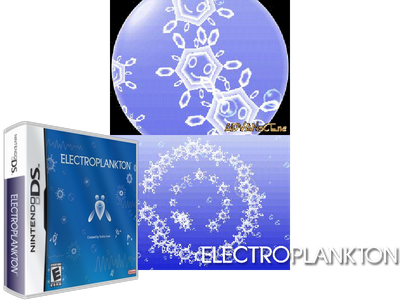
In electroplankton players interact with various "plankton" to create "media art". Using the ds touch screen, microphone, and other input methods, you can make the plankton to react, creating numerous audio and visual experiences. There are two modes performance and audience. In audience, the plankton will perform for you, as long as you see fit, or your battery will allow. In performance you can interact with the plankton and create your own audio-visual show. The various plankton are as follows 1. Tracy: you will have several plankton. They will move along lines you draw for them, their speed varying on how quickly you drew the lines. The sound they create changes depending on their speed and where they are on the screen. 2. Hanenbow: these little creatures launch out of a small body of water and bounce off the leaves of plants. Depending on the levees they bounce off of they will create different sounds. 3. Luminaria: you will have four plankton on a grid. Each has a different speed. Depending on what point on the grid they hit they will make a different sound. Arrows on the grid, that you can alter, will determine where they move. 4. Sun-animalcule: you place these little creatures on the screen and they will grow. As the become larger they will create different sounds. 5. Rec-rec: using the mic you can record four samples that then replay with various drumloops. 6. Nanocarp: these little plankton move about the screen randomly, they will alter how they move according to what you input. Touching one will make it "pling" and clapping twice will make them swim in a circle. 7. Lumiloop: you spin them around. They glow and make sound according to the direction and speed. 8. Marine-snow each of these plankton will make a tone when touched, and move about. 9. Beatnes: plays nes music and you can create repeating nes-esque music by touching the plankton on various parts of their bodies. 10. Volvoice: this plankton will record you voiced and the play it back in different ways.
In electroplankton players interact with various "plankton" to create "media art". Using the ds touch screen, microphone, and other input methods, you can make the plankton to react, creating numerous audio and visual experiences. There are two modes performance and audience. In audience, the plankton will perform for you, as long as you see fit, or your battery will allow. In performance you can interact with the plankton and create your own audio-visual show. The various plankton are as follows 1. Tracy: you will have several plankton. They will move along lines you draw for them, their speed varying on how quickly you drew the lines. The sound they create changes depending on their speed and where they are on the screen. 2. Hanenbow: these little creatures launch out of a small body of water and bounce off the leaves of plants. Depending on the levees they bounce off of they will create different sounds. 3. Luminaria: you will have four plankton on a grid. Each has a different speed. Depending on what point on the grid they hit they will make a different sound. Arrows on the grid, that you can alter, will determine where they move. 4. Sun-animalcule: you place these little creatures on the screen and they will grow. As the become larger they will create different sounds. 5. Rec-rec: using the mic you can record four samples that then replay with various drumloops. 6. Nanocarp: these little plankton move about the screen randomly, they will alter how they move according to what you input. Touching one will make it "pling" and clapping twice will make them swim in a circle. 7. Lumiloop: you spin them around. They glow and make sound according to the direction and speed. 8. Marine-snow each of these plankton will make a tone when touched, and move about. 9. Beatnes: plays nes music and you can create repeating nes-esque music by touching the plankton on various parts of their bodies. 10. Volvoice: this plankton will record you voiced and the play it back in different ways.
Dans l'électroplancton, les joueurs interagissent avec divers « planctons » pour créer un « art médiatique ». À l'aide de l'écran tactile du DS, du microphone et d'autres méthodes de saisie, vous pouvez faire réagir le plancton, créant ainsi de nombreuses expériences audio et visuelles. Il existe deux modes de performance et d'audience. En public, le plancton se produira pour vous, aussi longtemps que vous le jugerez bon, ou que votre batterie le permettra. En performance, vous pouvez interagir avec le plancton et créer votre propre spectacle audiovisuel. Les différents planctons sont les suivants 1. Tracy : vous aurez plusieurs plancton. Ils se déplaceront le long des lignes que vous tracez pour eux, leur vitesse variant en fonction de la rapidité avec laquelle vous avez tracé les lignes. Le son qu'ils créent change en fonction de leur vitesse et de l'endroit où ils se trouvent sur l'écran. 2. Hanenbow : ces petites créatures se lancent hors d'un petit plan d'eau et rebondissent sur les feuilles des plantes. En fonction des digues sur lesquelles ils rebondissent, ils créeront des sons différents. 3. Luminaria : vous aurez quatre planctons sur une grille. Chacun a une vitesse différente. Selon le point de la grille qu'ils touchent, ils émettront un son différent. Les flèches sur la grille, que vous pouvez modifier, détermineront où elles se déplacent. 4. Soleil-animalcule : vous placez ces petites créatures sur l'écran et elles grandiront. Au fur et à mesure qu’ils grandissent, ils créeront des sons différents. 5. Rec-rec : à l'aide du micro, vous pouvez enregistrer quatre échantillons qui seront ensuite rejoués avec diverses boucles de batterie. 6. Nanocarpe : ces petits planctons se déplacent sur l'écran de manière aléatoire, ils modifient leur façon de se déplacer en fonction de ce que vous saisissez. En toucher un le fera « pling » et applaudir deux fois le fera nager en cercle. 7. Lumiloop : vous les faites tourner. Ils brillent et émettent du son selon la direction et la vitesse. 8. Marine-neige chacun de ces planctons émettra un son lorsqu'on le touchera et se déplacera. 9. Beatnes : joue de la musique nes et vous pouvez créer de la musique nes-esque répétitive en touchant le plancton sur différentes parties de leur corps. 10. Volvoice : ce plancton enregistrera votre voix et la restituera de différentes manières.
Nell'elettroplancton i giocatori interagiscono con vari "plancton" per creare "media art". Utilizzando il touch screen del DS, il microfono e altri metodi di input, puoi far reagire il plancton, creando numerose esperienze audio e visive. Ci sono due modalità: performance e pubblico. In pubblico, il plancton si esibirà per te, finché lo riterrai opportuno o la tua batteria lo consentirà. Durante la performance puoi interagire con il plancton e creare il tuo spettacolo audiovisivo. I vari plancton sono i seguenti 1. Tracy: avrai diversi plancton. Si muoveranno lungo le linee che disegni per loro, la loro velocità varia in base alla velocità con cui hai disegnato le linee. Il suono che creano cambia a seconda della loro velocità e della posizione in cui si trovano sullo schermo. 2. Hanenbow: queste piccole creature si lanciano da un piccolo specchio d'acqua e rimbalzano sulle foglie delle piante. A seconda degli argini su cui rimbalzano, creeranno suoni diversi. 3. Luminaria: avrai quattro plancton su una griglia. Ognuno ha una velocità diversa. A seconda del punto della griglia che colpiranno, produrranno un suono diverso. Le frecce sulla griglia, che puoi modificare, determineranno dove si muoveranno. 4. Animale solare: posiziona queste piccole creature sullo schermo e cresceranno. Man mano che diventano più grandi creeranno suoni diversi. 5. Rec-rec: utilizzando il microfono è possibile registrare quattro campioni che poi vengono riprodotti con vari drumloop. 6. Nanocarpo: questi piccoli plancton si muovono sullo schermo in modo casuale, modificheranno il modo in cui si muovono in base a ciò che inserisci. Toccandone uno lo farà "pling" e battendo le mani due volte li farà nuotare in cerchio. 7. Lumiloop: li fai girare. Si illuminano e producono suoni in base alla direzione e alla velocità. 8. Neve marina ciascuno di questi plancton emette un tono quando viene toccato e si muove. 9. Beatnes: riproduce musica nes e puoi creare musica ripetuta in stile nes toccando il plancton su varie parti del loro corpo. 10. Volvoice: questo plancton registrerà la tua voce e la riprodurrà in diversi modi.
Consejos
- Experimenta con el stylus; la velocidad y el ángulo de movimiento cambian el tono del sonido.
Consulta los trucos y consejos completos y siempre actualizados de este juego en la app.
- Experiment with the stylus; The speed and angle of movement change the pitch of the sound.
Consulta los trucos y consejos completos y siempre actualizados de este juego en la app.
- Expérimentez avec le stylet ; La vitesse et l'angle du mouvement modifient la hauteur du son.
Consulta los trucos y consejos completos y siempre actualizados de este juego en la app.
- Sperimenta con lo stilo; La velocità e l'angolo di movimento modificano l'altezza del suono.
Consulta los trucos y consejos completos y siempre actualizados de este juego en la app.