
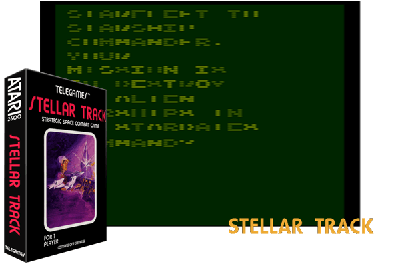
STELLAR TRACK
Descripción
This is an atari 2600 version of a star trek game found on many college mainframes. Like those mainframe programs, it has no graphics, only text. You use the joystick, moving left or right, to select the command you want then press the red button. You then move the joystick left or right to select set the parameters of that command, if there are any. You start by pressing reset or select to choose how many enemies you must kill in how many stardates. The commands and any settings are as follows: galaxy map=a 6x6 grid that starts out empty until you do a long range scan. Afterwards, the quadrants will show a 2 digit number. The left digit is the number of aliens in the area. The right digit will either be a 1 or a zero, depending on whether there is or is not a starbase in that area. Galaxy map costs you no energy or stardates. Lr scan=long range scan. This will tell you what is in your quadrant and all the quadrants next to yours. If there are any enemies in your quadrant when you do an lr scan, they will attack you. Lr scan does not cost energy or stardates but it does take a turn. Sr scan=short range scan. This shows you the stars, aliens and starbases in your quadrant. You need to do this to destroy aliens and dock with starbases. Like lr scan, if there are aliens in your quadrant, they will attack after you use sr scan. Also, like lr scan, sr scan does not cost energy or stardates but it does take a turn. Warp=warp is how you move, either from quadrant to quadrant or from sector to sector within a quadrant. You move by setting 2 settings. The first is your direction. You select a direction based on the numbers below: 8 1 2 / 7--*--3 / 6 5 4 next, you select how many quadrants and sectors to move. If you want to move within a quadrant, set the left number to zero so you don't warp out of that quadrant. Warp uses stardates, energy and a turn. If you warp into a quadrant that has only you and stars, the screen will be green. If you warp into a quadrant with aliens or aliens and a starbase, the screen will be red. If you warp into a quadrant with just the starbase, the screen will be gray. You cannot warp through stars. If you try, you lose the stardate and energy but don't go anywhere. Photon torpedo=if you hit an enemy with one of these, just one shot kills them. You select the direction with the same numbers as warp. There must be a clear line of sight between you and the enemy; no stars. You carry up to 9 torpedoes and they can be replenished. Photon torpedoes do not cost energy or time, just a turn. Phasers=unlike photon torpedoes, you do not need to be directly in line of the enemy or tell the game where to fire. You just set how strong you want the blast to be, via a three digit number, and the computer fires. The closer you are to the enemy, the harder you hit. Phasers use the amount of energy from you as you fired. You also use a turn. Status=a status report. This will tell you how many stardates, aliens, energy units and photon torpedoes are left and whether you have taken damage and to what. If you have taken damage, you will see a negative number next to the damaged item. This is how many stardates it will take to repair the item on your own. You cannot leave the quadrant if your engines are damaged. Instead, you must try to warp the number of quadrants that would take that much time. You won't go anywhere but you will repair. If you dock at a starbase, you are instantly repaired of all damage, refueled and torpedoes are restocked. Starbases are placed randomly in the galaxy and never move or get destroyed. There are always two per galaxy. To dock, warp to the quadrant and sector where the base is, so you over the top of it. Skill (difficulty) switches the right switch controls how easily you take damage. In the expert (a) position, your chance of taking damage is twice as likely as in the novice (b) position. The left switch controls phaser strength. In the novice (b) position, your phasers are twice as strong as the aliens'. In the expert (a) position, your phasers are the same strength as the aliens'.
This is an atari 2600 version of a star trek game found on many college mainframes. Like those mainframe programs, it has no graphics, only text. You use the joystick, moving left or right, to select the command you want then press the red button. You then move the joystick left or right to select set the parameters of that command, if there are any. You start by pressing reset or select to choose how many enemies you must kill in how many stardates. The commands and any settings are as follows: galaxy map=a 6x6 grid that starts out empty until you do a long range scan. Afterwards, the quadrants will show a 2 digit number. The left digit is the number of aliens in the area. The right digit will either be a 1 or a zero, depending on whether there is or is not a starbase in that area. Galaxy map costs you no energy or stardates. Lr scan=long range scan. This will tell you what is in your quadrant and all the quadrants next to yours. If there are any enemies in your quadrant when you do an lr scan, they will attack you. Lr scan does not cost energy or stardates but it does take a turn. Sr scan=short range scan. This shows you the stars, aliens and starbases in your quadrant. You need to do this to destroy aliens and dock with starbases. Like lr scan, if there are aliens in your quadrant, they will attack after you use sr scan. Also, like lr scan, sr scan does not cost energy or stardates but it does take a turn. Warp=warp is how you move, either from quadrant to quadrant or from sector to sector within a quadrant. You move by setting 2 settings. The first is your direction. You select a direction based on the numbers below: 8 1 2 / 7--*--3 / 6 5 4 next, you select how many quadrants and sectors to move. If you want to move within a quadrant, set the left number to zero so you don't warp out of that quadrant. Warp uses stardates, energy and a turn. If you warp into a quadrant that has only you and stars, the screen will be green. If you warp into a quadrant with aliens or aliens and a starbase, the screen will be red. If you warp into a quadrant with just the starbase, the screen will be gray. You cannot warp through stars. If you try, you lose the stardate and energy but don't go anywhere. Photon torpedo=if you hit an enemy with one of these, just one shot kills them. You select the direction with the same numbers as warp. There must be a clear line of sight between you and the enemy; no stars. You carry up to 9 torpedoes and they can be replenished. Photon torpedoes do not cost energy or time, just a turn. Phasers=unlike photon torpedoes, you do not need to be directly in line of the enemy or tell the game where to fire. You just set how strong you want the blast to be, via a three digit number, and the computer fires. The closer you are to the enemy, the harder you hit. Phasers use the amount of energy from you as you fired. You also use a turn. Status=a status report. This will tell you how many stardates, aliens, energy units and photon torpedoes are left and whether you have taken damage and to what. If you have taken damage, you will see a negative number next to the damaged item. This is how many stardates it will take to repair the item on your own. You cannot leave the quadrant if your engines are damaged. Instead, you must try to warp the number of quadrants that would take that much time. You won't go anywhere but you will repair. If you dock at a starbase, you are instantly repaired of all damage, refueled and torpedoes are restocked. Starbases are placed randomly in the galaxy and never move or get destroyed. There are always two per galaxy. To dock, warp to the quadrant and sector where the base is, so you over the top of it. Skill (difficulty) switches the right switch controls how easily you take damage. In the expert (a) position, your chance of taking damage is twice as likely as in the novice (b) position. The left switch controls phaser strength. In the novice (b) position, your phasers are twice as strong as the aliens'. In the expert (a) position, your phasers are the same strength as the aliens'.
Il s'agit d'une version Atari 2600 d'un jeu Star Trek que l'on trouve sur de nombreux ordinateurs centraux universitaires. Comme ces programmes mainframe, il ne contient pas de graphiques, seulement du texte. Vous utilisez le joystick, en vous déplaçant vers la gauche ou la droite, pour sélectionner la commande souhaitée puis appuyez sur le bouton rouge. Vous déplacez ensuite le joystick vers la gauche ou la droite pour sélectionner les paramètres de cette commande, le cas échéant. Vous commencez par appuyer sur réinitialiser ou sélectionnez pour choisir le nombre d’ennemis que vous devez tuer en combien de dates stellaires. Les commandes et tous les paramètres sont les suivants : carte de la galaxie = une grille 6x6 qui commence vide jusqu'à ce que vous effectuiez une analyse à longue portée. Ensuite, les quadrants afficheront un nombre à 2 chiffres. Le chiffre de gauche est le nombre d’étrangers dans la zone. Le chiffre de droite sera soit un 1, soit un zéro, selon qu'il y a ou non une base stellaire dans cette zone. La carte de la galaxie ne vous coûte ni énergie ni dates stellaires. Scan Lr = scan longue portée. Cela vous dira ce qu'il y a dans votre quadrant et dans tous les quadrants à côté du vôtre. S'il y a des ennemis dans votre quadrant lorsque vous effectuez un scan LR, ils vous attaqueront. Lr scan ne coûte pas d'énergie ni de dates stellaires, mais il prend un tour. Scan Sr = scan à courte portée. Cela vous montre les étoiles, les extraterrestres et les bases stellaires dans votre quadrant. Vous devez faire cela pour détruire les extraterrestres et vous connecter aux bases stellaires. Comme lr scan, s'il y a des extraterrestres dans votre quadrant, ils attaqueront après que vous ayez utilisé sr scan. De plus, comme lr scan, sr scan ne coûte pas d'énergie ni de dates stellaires, mais il prend un tour. Warp=warp est la façon dont vous vous déplacez, soit de quadrant en quadrant, soit de secteur en secteur dans un quadrant. Vous vous déplacez en définissant 2 paramètres. Le premier est votre direction. Vous sélectionnez une direction en fonction des chiffres ci-dessous : 8 1 2 / 7--*--3 / 6 5 4 Ensuite, vous sélectionnez le nombre de quadrants et de secteurs à déplacer. Si vous souhaitez vous déplacer dans un quadrant, réglez le nombre de gauche sur zéro afin de ne pas sortir de ce quadrant. Warp utilise des dates stellaires, de l'énergie et un tour. Si vous vous déplacez dans un quadrant qui ne contient que vous et des étoiles, l'écran sera vert. Si vous vous déplacez dans un quadrant avec des extraterrestres ou des extraterrestres et une base stellaire, l'écran sera rouge. Si vous vous déplacez dans un quadrant avec uniquement la base stellaire, l'écran sera gris. Vous ne pouvez pas vous déplacer à travers les étoiles. Si vous essayez, vous perdez la date stellaire et l'énergie, mais vous n'allez nulle part. Torpille à photons = si vous frappez un ennemi avec l'une d'entre elles, un seul coup le tue. Vous sélectionnez la direction avec les mêmes numéros que la chaîne. Il doit y avoir une ligne de vue dégagée entre vous et l’ennemi ; pas d'étoiles. Vous transportez jusqu'à 9 torpilles et elles peuvent être réapprovisionnées. Les torpilles à photons ne coûtent ni énergie ni temps, juste un tour. Phasers = contrairement aux torpilles à photons, vous n'avez pas besoin d'être directement dans la ligne de l'ennemi ni d'indiquer au jeu où tirer. Vous définissez simplement la force de l'explosion, via un nombre à trois chiffres, et l'ordinateur se déclenche. Plus vous êtes proche de l’ennemi, plus vous frappez fort. Les phaseurs utilisent la quantité d'énergie que vous fournissez lorsque vous tirez. Vous utilisez également un tour. Statut = un rapport de statut. Cela vous dira combien de dates stellaires, d'extraterrestres, d'unités d'énergie et de torpilles à photons restent et si vous avez subi des dégâts et sur quoi. Si vous avez subi des dégâts, vous verrez un nombre négatif à côté de l'objet endommagé. C'est le nombre de dates qu'il faudra pour réparer l'article par vous-même. Vous ne pouvez pas quitter le quadrant si vos moteurs sont endommagés. Au lieu de cela, vous devez essayer de déformer le nombre de quadrants, ce qui prendrait autant de temps. Vous n'irez nulle part mais vous réparerez. Si vous accostez à une base stellaire, vous êtes instantanément réparé de tous les dégâts, ravitaillé et les torpilles sont réapprovisionnées. Les bases stellaires sont placées au hasard dans la galaxie et ne bougent ni ne sont jamais détruites. Il y en a toujours deux par galaxie. Pour accoster, dirigez-vous vers le quadrant et le secteur où se trouve la base, de manière à ce que vous soyez au-dessus de celle-ci. Changements de compétence (difficulté) le bon interrupteur contrôle la facilité avec laquelle vous subissez des dégâts. En position expert (a), vos chances de subir des dégâts sont deux fois plus probables qu'en position novice (b). Le commutateur gauche contrôle la force du phaser. En position novice (b), vos phaseurs sont deux fois plus puissants que ceux des extraterrestres. En position expert (a), vos phaseurs ont la même force que ceux des extraterrestres.
Questa è una versione Atari 2600 di un gioco di Star Trek presente su molti mainframe universitari. Come quei programmi mainframe, non ha grafica, solo testo. Utilizza il joystick, spostandoti a sinistra o a destra, per selezionare il comando desiderato, quindi premi il pulsante rosso. Quindi spostare il joystick a sinistra o a destra per selezionare e impostare i parametri di quel comando, se presenti. Inizi premendo Reset o seleziona per scegliere quanti nemici devi uccidere in quante date stellari. I comandi e le eventuali impostazioni sono i seguenti: mappa galattica=una griglia 6x6 che inizia vuota finché non esegui una scansione a lungo raggio. Successivamente, i quadranti mostreranno un numero a 2 cifre. La cifra di sinistra è il numero di alieni nell'area. La cifra destra sarà un 1 o uno zero, a seconda che ci sia o meno una base stellare in quell'area. La mappa galattica non ti costa energia o date stellari. Lr scan=scansione a lungo raggio. Questo ti dirà cosa c'è nel tuo quadrante e in tutti i quadranti accanto al tuo. Se ci sono nemici nel tuo quadrante quando esegui una scansione lr, ti attaccheranno. La scansione Lr non costa energia o date stellari ma richiede un turno. Sr scan=scansione a corto raggio. Questo ti mostra le stelle, gli alieni e le basi stellari nel tuo quadrante. Devi farlo per distruggere gli alieni e attraccare alle basi stellari. Come lr scan, se ci sono alieni nel tuo quadrante, attaccheranno dopo aver usato sr scan. Inoltre, come lr scan, sr scan non costa energia o date stellari ma richiede una svolta. Warp=warp è il modo in cui ti sposti, da quadrante a quadrante o da settore a settore all'interno di un quadrante. Ti muovi impostando 2 impostazioni. Il primo è la tua direzione. Seleziona una direzione in base ai numeri seguenti: 812 / 7--*--3 / 654 successivamente, selezioni quanti quadranti e settori spostare. Se vuoi spostarti all'interno di un quadrante, imposta il numero di sinistra su zero in modo da non uscire da quel quadrante. Warp utilizza date stellari, energia e una svolta. Se ti teletrasporti in un quadrante che contiene solo te e le stelle, lo schermo sarà verde. Se ti teletrasporti in un quadrante con alieni o alieni e una base stellare, lo schermo sarà rosso. Se ti teletrasporti in un quadrante solo con la base stellare, lo schermo sarà grigio. Non puoi deformarti attraverso le stelle. Se ci provi, perdi la data stellare e l'energia ma non vai da nessuna parte. Siluro fotonico=se colpisci un nemico con uno di questi, un solo colpo lo uccide. Seleziona la direzione con gli stessi numeri di Warp. Deve esserci una linea di vista libera tra te e il nemico; niente stelle. Trasporta fino a 9 siluri e possono essere riforniti. I siluri fotonici non costano energia o tempo, solo un turno. Phaser=a differenza dei siluri fotonici, non è necessario essere direttamente in linea con il nemico o dire al gioco dove sparare. Basta impostare la forza dell'esplosione tramite un numero di tre cifre e il computer si accende. Più sei vicino al nemico, più forte sarà il tuo colpo. I Phaser utilizzano la quantità di energia che ricevi mentre spari. Usi anche un turno. Stato=un rapporto sullo stato. Questo ti dirà quanti dati stellari, alieni, unità energetiche e siluri fotonici sono rimasti e se hai subito danni e cosa. Se hai subito danni, vedrai un numero negativo accanto all'oggetto danneggiato. Questo è il numero di date stellari necessarie per riparare l'oggetto da solo. Non puoi lasciare il quadrante se i tuoi motori sono danneggiati. Invece, devi provare a deformare il numero di quadranti che richiederebbero così tanto tempo. Non andrai da nessuna parte ma riparerai. Se attracchi a una base stellare, verrai immediatamente riparato da tutti i danni, rifornito di carburante e rifornito i siluri. Le basi stellari vengono posizionate casualmente nella galassia e non si muovono né vengono mai distrutte. Ce ne sono sempre due per galassia. Per attraccare, teleportati al quadrante e al settore dove si trova la base, così da superarla. Cambia abilità (difficoltà). l'interruttore destro controlla la facilità con cui subisci danni. Nella posizione di esperto (a), la probabilità di subire danni è doppia rispetto alla posizione di principiante (b). L'interruttore sinistro controlla la potenza del faser. Nella posizione principiante (b), i tuoi Phaser sono due volte più potenti di quelli degli alieni. Nella posizione esperto (a), i tuoi Phaser hanno la stessa forza di quelli degli alieni.
Consejos
- La precisión es clave.
- Sigue las estrellas.
- Sé rápido.
Consulta los trucos y consejos completos y siempre actualizados de este juego en la app.
Descargar gratis en Google Play- Precision is key.
- Follow the stars.
- Be quick.
Consulta los trucos y consejos completos y siempre actualizados de este juego en la app.
Descargar gratis en Google Play- La précision est la clé.
- Suivez les étoiles.
- Soyez rapide.
Consulta los trucos y consejos completos y siempre actualizados de este juego en la app.
Descargar gratis en Google Play- La precisione è fondamentale.
- Segui le stelle.
- Sii veloce.
Consulta los trucos y consejos completos y siempre actualizados de este juego en la app.
Descargar gratis en Google Play