
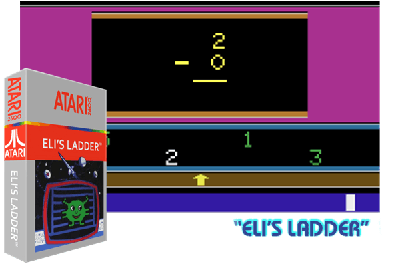
ELI'S LADDER
Descripción
This game was designed to help teach children addition, subtraction and counting. Eli needs to return to his spaceship. You move him up the ladder by solving addition or subtraction problems. A problem appears with four answer choices below. Move the joystick left or right to select your answer then press the button. After 20 questions, eli reaches his ship. If you got 18 or more answers correct, eli will jump for joy and there will be a flashing word wow. The child always uses the right joystick. In two player settings, the left joystick is used by the parent to advance to the next problem, start the game and count apples. In one player, you advance automatically. The left difficulty switch is used to select one or two player. The right difficulty switch is used to select addition or subtraction. These must be selected at the main menu before you begin your game. The game select switch returns you to the main menu if you are in a game or changes the game number on the main menu. The tv type switch switches in and out of the counting screen in a game or set the speed of the pacer (timer) on the main menu. There are three types of games, each with up to ten difficulty levels. In game type one, called practice, there is no time limit. The child can take as long as needed to answer the problem. In game type two, called pacer, there will be a plus or minus sign at the bottom that moves from left to right. If it reaches the right side barrier, the problem is marked as wrong then it is on to the next problem. You can set the pacer speed from the main menu with the ty type switch. If your difficulty level allows for counting, when you switch to the counting apples screen, the timer stops and when you return, it resets. In game type three, called phantom, in addition to having a time limit, the only answer selection that shows is the one that the arrow is under.
This game was designed to help teach children addition, subtraction and counting. Eli needs to return to his spaceship. You move him up the ladder by solving addition or subtraction problems. A problem appears with four answer choices below. Move the joystick left or right to select your answer then press the button. After 20 questions, eli reaches his ship. If you got 18 or more answers correct, eli will jump for joy and there will be a flashing word wow. The child always uses the right joystick. In two player settings, the left joystick is used by the parent to advance to the next problem, start the game and count apples. In one player, you advance automatically. The left difficulty switch is used to select one or two player. The right difficulty switch is used to select addition or subtraction. These must be selected at the main menu before you begin your game. The game select switch returns you to the main menu if you are in a game or changes the game number on the main menu. The tv type switch switches in and out of the counting screen in a game or set the speed of the pacer (timer) on the main menu. There are three types of games, each with up to ten difficulty levels. In game type one, called practice, there is no time limit. The child can take as long as needed to answer the problem. In game type two, called pacer, there will be a plus or minus sign at the bottom that moves from left to right. If it reaches the right side barrier, the problem is marked as wrong then it is on to the next problem. You can set the pacer speed from the main menu with the ty type switch. If your difficulty level allows for counting, when you switch to the counting apples screen, the timer stops and when you return, it resets. In game type three, called phantom, in addition to having a time limit, the only answer selection that shows is the one that the arrow is under.
Ce jeu a été conçu pour aider les enfants à apprendre l’addition, la soustraction et le comptage. Eli doit retourner à son vaisseau spatial. Vous le faites gravir les échelons en résolvant des problèmes d’addition ou de soustraction. Un problème apparaît avec quatre choix de réponses ci-dessous. Déplacez le joystick vers la gauche ou la droite pour sélectionner votre réponse puis appuyez sur le bouton. Après 20 questions, Eli atteint son navire. Si vous avez 18 réponses correctes ou plus, Eli sautera de joie et il y aura un mot clignotant wow. L'enfant utilise toujours le joystick droit. Dans les configurations à deux joueurs, le joystick gauche est utilisé par le parent pour passer au problème suivant, démarrer le jeu et compter les pommes. En un seul joueur, vous avancez automatiquement. Le commutateur de difficulté de gauche est utilisé pour sélectionner un ou deux joueurs. Le bouton de difficulté droit est utilisé pour sélectionner l’addition ou la soustraction. Ceux-ci doivent être sélectionnés dans le menu principal avant de commencer votre partie. Le commutateur de sélection de jeu vous ramène au menu principal si vous êtes dans un jeu ou modifie le numéro de jeu dans le menu principal. Le commutateur de type TV permet d'entrer et de sortir de l'écran de comptage dans un jeu ou de régler la vitesse du stimulateur (minuterie) dans le menu principal. Il existe trois types de jeux, chacun comportant jusqu'à dix niveaux de difficulté. Dans le premier type de jeu, appelé entraînement, il n’y a pas de limite de temps. L’enfant peut prendre le temps nécessaire pour répondre au problème. Dans le type de jeu deux, appelé Pacer, il y aura un signe plus ou moins en bas qui se déplace de gauche à droite. S'il atteint la barrière du côté droit, le problème est marqué comme faux, puis on passe au problème suivant. Vous pouvez régler la vitesse du stimulateur à partir du menu principal avec le commutateur de type ty. Si votre niveau de difficulté permet de compter, lorsque vous passez à l'écran de comptage des pommes, le chronomètre s'arrête et à votre retour, il se réinitialise. Dans le jeu de type trois, appelé fantôme, en plus d'avoir une limite de temps, la seule sélection de réponse qui s'affiche est celle sous laquelle se trouve la flèche.
Questo gioco è stato progettato per aiutare a insegnare ai bambini addizioni, sottrazioni e conteggi. Eli deve tornare sulla sua astronave. Lo fai salire sulla scala risolvendo problemi di addizione o sottrazione. Viene visualizzato un problema con quattro opzioni di risposta di seguito. Muovi il joystick a sinistra o a destra per selezionare la risposta, quindi premi il pulsante. Dopo 20 domande, Eli raggiunge la sua nave. Se hai risposto correttamente a 18 o più, Eli salterà di gioia e apparirà una parola lampeggiante wow. Il bambino usa sempre il joystick giusto. Nelle impostazioni a due giocatori, il joystick sinistro viene utilizzato dal genitore per avanzare al problema successivo, avviare il gioco e contare le mele. In un giocatore, avanzi automaticamente. L'interruttore di difficoltà sinistro viene utilizzato per selezionare uno o due giocatori. L'interruttore di difficoltà destro viene utilizzato per selezionare l'addizione o la sottrazione. Questi devono essere selezionati nel menu principale prima di iniziare il gioco. L'interruttore di selezione del gioco ti riporta al menu principale se stai giocando o modifica il numero del gioco nel menu principale. L'interruttore del tipo di televisore attiva e disattiva la schermata di conteggio in un gioco o imposta la velocità del pacer (timer) nel menu principale. Esistono tre tipi di giochi, ciascuno con un massimo di dieci livelli di difficoltà. Nel gioco di tipo uno, chiamato pratica, non c'è limite di tempo. Il bambino può impiegare tutto il tempo necessario per rispondere al problema. Nel gioco di tipo due, chiamato pacer, ci sarà un segno più o meno in basso che si sposta da sinistra a destra. Se raggiunge la barriera del lato destro, il problema viene contrassegnato come sbagliato e si passa al problema successivo. È possibile impostare la velocità del pacer dal menu principale con l'interruttore del tipo di ty. Se il tuo livello di difficoltà consente il conteggio, quando passi alla schermata di conteggio delle mele, il timer si ferma e quando torni si azzera. Nel gioco di tipo tre, chiamato fantasma, oltre ad avere un limite di tempo, l'unica selezione di risposta che viene mostrata è quella sotto cui si trova la freccia.
Consejos
- Céntrate en el objetivo.
- Evita los obstáculos.
- Planifica la subida.
- Usa las escaleras para avanzar.
Consulta los trucos y consejos completos y siempre actualizados de este juego en la app.
Descargar gratis en Google Play- Focus on the objective.
- Avoid obstacles.
- Plan the climb.
- Use the stairs to move forward.
Consulta los trucos y consejos completos y siempre actualizados de este juego en la app.
Descargar gratis en Google Play- Concentrez-vous sur l'objectif.
- Évitez les obstacles.
- Planifiez la montée.
- Utilisez les escaliers pour avancer.
Consulta los trucos y consejos completos y siempre actualizados de este juego en la app.
Descargar gratis en Google Play- Concentrarsi sull'obiettivo.
- Evitare gli ostacoli.
- Pianifica la salita.
- Usa le scale per andare avanti.
Consulta los trucos y consejos completos y siempre actualizados de este juego en la app.
Descargar gratis en Google Play